
Flow Nodes
Nodes are the fundamental building blocks of every Flow — the individual steps that define what happens, in what order, and under what conditions.
Each node performs a discrete action: it might load data, evaluate a condition, assign a variable, call another process, or finalize output.
Together, nodes form a directed graph of logic, where the sequence and structure define how the process behaves from start to finish.
If you think of the Flow as a sentence, nodes are its words: each one has meaning on its own, but only through connection do they form a coherent process.
Role and Function
Nodes tell the system how to execute business logic.
Their role is to:
Execute atomic operations (load, calculate, update, decide).
Pass results through Process Variables and the DataStore.
Control the flow of logic through branches, conditions, or subflows.
Define the entry and exit points of a process.
Because nodes are modular and metadata-driven, the same logic can be easily rearranged, extended, or reused without any coding.
Structure of a Node
Each node has a consistent internal structure composed of:
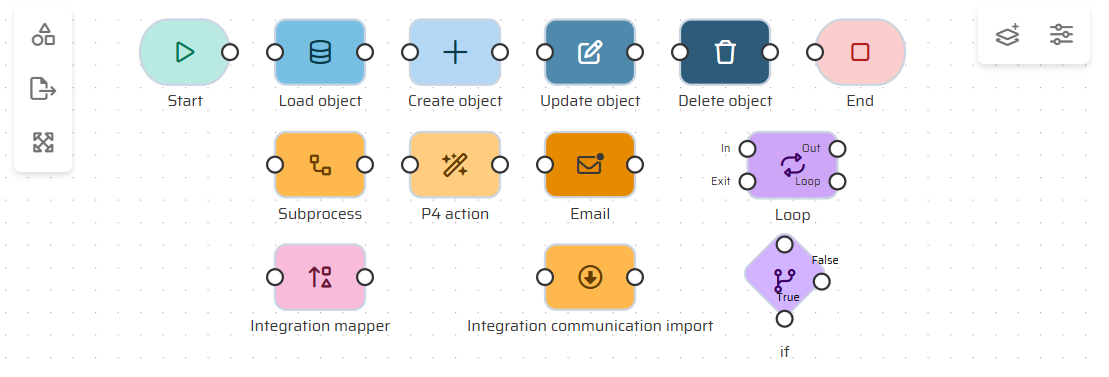
Type: Defines what the node does (e.g., Start, End, Load Data, Condition, Connect).
Inputs: Variables or data required for execution.
Operation: The specific logic or action performed by the node.
Outputs: Variables that are updated or passed to the next node via DataStore.
Connections: Links to subsequent nodes that define the execution path.
Nodes are typed objects within the Flow Builder. Each type has a specific purpose and available configuration parameters, making process logic explicit and visually traceable.
Execution Model
When a Flow runs, the platform processes nodes sequentially or conditionally, depending on how they’re connected.
The Start Node initializes variables and context.
The Flow proceeds through connected nodes, each modifying the DataStore or variables as needed.
Conditional or branching nodes decide the next path based on evaluated values.
Execution continues until an End Node is reached, which finalizes the process and returns results.
During execution, each node operates in-memory, ensuring that no permanent data changes occur until the process concludes successfully. This makes Flows predictable, testable, and safe to iterate on.
Node Types
Interaction with Variables and DataStore
Every node operates through Process Variables and the DataStore:
Variables carry inputs and outputs between nodes.
The DataStore holds objects and collections that persist temporarily through the process.
When a node finishes execution, it updates these structures so the next node receives the correct context.
This unified data layer allows nodes to work independently yet stay perfectly synchronized within the Flow.
Error Handling and Debugging
Because nodes execute sequentially, errors are easy to localize and diagnose.
When debugging, the Flow Builder displays:
Which node executed last before failure.
Input and output variable states.
DataStore contents at that exact step.
This granularity allows users to pinpoint logical issues quickly without risking persistent data.
Best Practices
Design nodes to perform one clear action; complexity belongs in structure, not in single steps.
Use consistent naming and descriptions so that Flows are self-documenting.
Chain nodes logically — the execution path should tell a story, not a riddle.
Reuse standard node patterns for recurring logic (e.g., validation, data loading).
Keep Flow diagrams readable; too many crisscrossing paths often signal poor modularity.
Summary
Nodes are the atomic units of logic in the Flow Builder — modular, visual instructions that define how business processes behave.
By linking nodes together through variables and the DataStore, users can design complex, transactional workflows entirely without code.
The strength of the Process Builder lies in these small, consistent pieces — simple individually, but powerful when connected.