
Flow Builder (Process Logic Layer)
Flow Builder defines the logical processes that drive system actions - loading, creating, updating, and deleting data. It is the core automation layer of the P4 Process Builder, responsible for describing how information moves and changes inside the system.
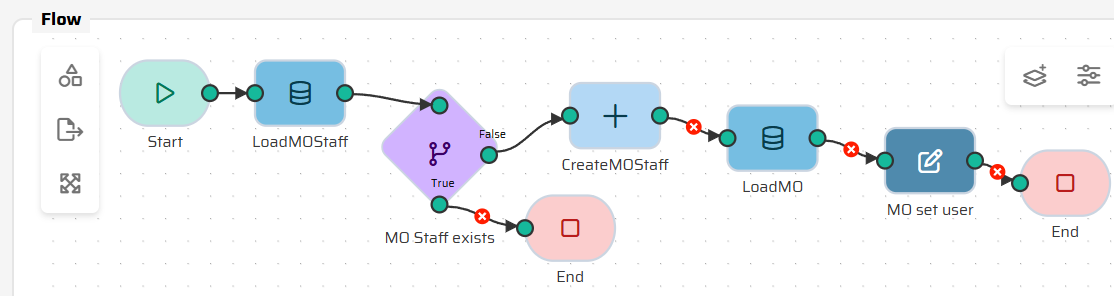
Each Flow represents a self-contained business process, made up of connected nodes that define operations and control logic. Flows can range from simple single-step actions (e.g., Create Work Order) to complex transactional workflows (e.g., Generate Preventive Maintenance Plan).
Flows are designed to be modular and composable. Smaller processes can be reused as subflows within larger ones, ensuring flexibility and reducing duplication.
When to Use It
Use Flow Builder to:
Automate repetitive business tasks or data transformations.
Define backend logic that supports widgets, layouts, or AI actions.
Integrate external systems or APIs via process nodes.
Create transactional data operations that maintain consistency across multiple entities.
Flows are the foundation for every application process in P4. Every UI action, Artoo command, or scheduled task ultimately executes one or more Flows.
Flow Lifecycle and Execution
Initialization – The process starts in the Start Node, where input variables and execution context are prepared.
Processing – Logic runs through connected nodes (Load, Condition, Create, etc.), manipulating in-memory data stored in the DataStore.
Finalization – The End Node commits results, returning defined output variables to the UI or API and optionally writing changes to the database.
Flows execute in memory. Only when the process successfully reaches an End Node are changes persisted to the database. This guarantees transactional integrity - if a process fails midway, no partial updates remain.