
Process Variables
Process Variables are user-defined variables that represent the internal data context of a single Flow execution.
They can store any type of value — from simple user inputs and flags to complex objects or collections loaded from the database.
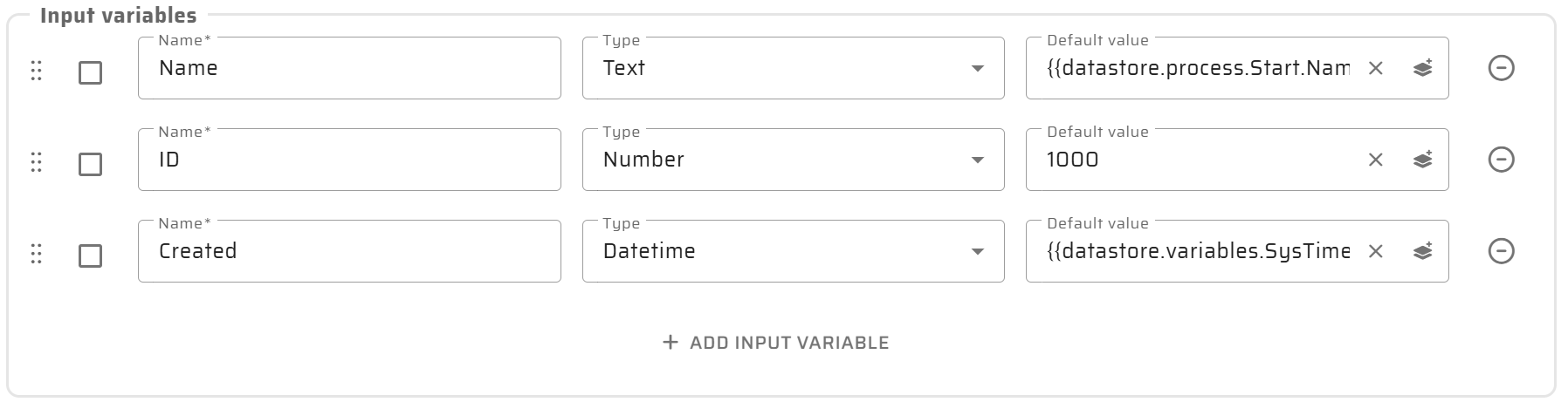
Variables are declared at the process level and define what data a Flow expects, manipulates, and produces during its execution.
Each variable has:
Name: unique identifier within the Flow.
Data type: defines allowed structure and validation rules.
Scope: determines visibility and lifetime within the process.
Default value (optional): used if no input is provided.
Variable context and isolation
Except for Global Variables, all Process Variables are scoped strictly to a single process execution.
This means:
Variables are not shared automatically between different Flows.
Variables are not shared between UI Widgets and Flows.
Variables are not shared between parent processes and subflows.
Each Flow and Subprocess has its own isolated variable context.
Any data exchange between:
different Processes,
Process and Subprocess,
UI Widgets and Flows,
must be done explicitly via Input Variables and Output Variables.
This explicit data contract ensures:
clear data ownership,
predictable behavior,
and reusability of Flows across different contexts.
Scopes of variables
Global variables
Accessible from any node or subflow. Used for cross-process data such as user context, configuration, or constants.Local variables
User-defined variables available only within the current Flow execution.
They can store any value but do not persist or propagate outside the process.Input variables
Values passed into the Flow from a Widget, Layout, another Flow, or an external API at the start of execution.Output variables
Explicitly defined values returned from the Flow to the UI, another Flow, or Artoo after execution completes.
Best Practices
Use clear and descriptive names reflecting business meaning (e.g.,
activeWorkOrders, notvar1).Always define data types and scopes explicitly.
Initialize variables with default values to prevent null errors.
Keep variable lists minimal - avoid unused or redundant ones.
Use output variables only for data truly needed by the UI or API.
Document variable purpose and usage; Artoo uses these descriptions to generate or explain Flows.