
Release to Launcher (Recycling Finished Cards)
The very last part of our core logic is taking a card from the "Finished" state and returning it back to the "Launcher" so the material cycle can begin again. This process is delightfully simple.
Create a new flow named Release to Launcher.
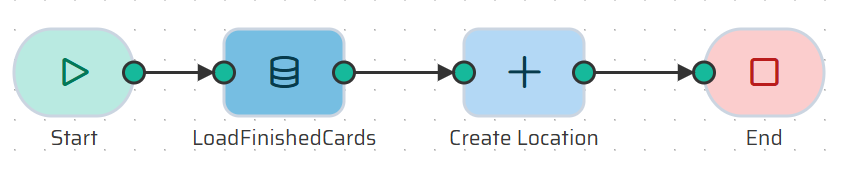
Step 1: The Start Node
Add an Input Variable:
KANBAN_LOOP_ID(Type: Number).
Step 2: Load the First Finished Card We just need to grab the oldest available Finished card.
Add a Load Object node named LoadFinishedCards.
Entity:
KANBAN_CARDS_VIEW.Filters:
KANBAN_LOOP_IDEquals your Start variable, ANDLAST_LOCATIONEqualsFinished.Limit: Select
Single record.
Step 3: Move Back to Launcher Now, log its new location to move it.
Add a Create Object node named Create Location.
Entity:
KANBAN_CARD_LOCATION.Id_kanban_card: Map this to
{{datastore.process.LoadFinishedCards.card_id}}.Location: Type the static value
Launcher.
Step 4: End Node
Connect your Create Object node to an End node to finish the transaction and save the data to the database.
Backend Complete!
Congratulations! You have successfully built the entire database and business logic for a Kanban application. The hardest part is over.
Now, we get to the fun part: making it visible. Next up: ➔ Creating the Interactive UI (Widgets)