
Main
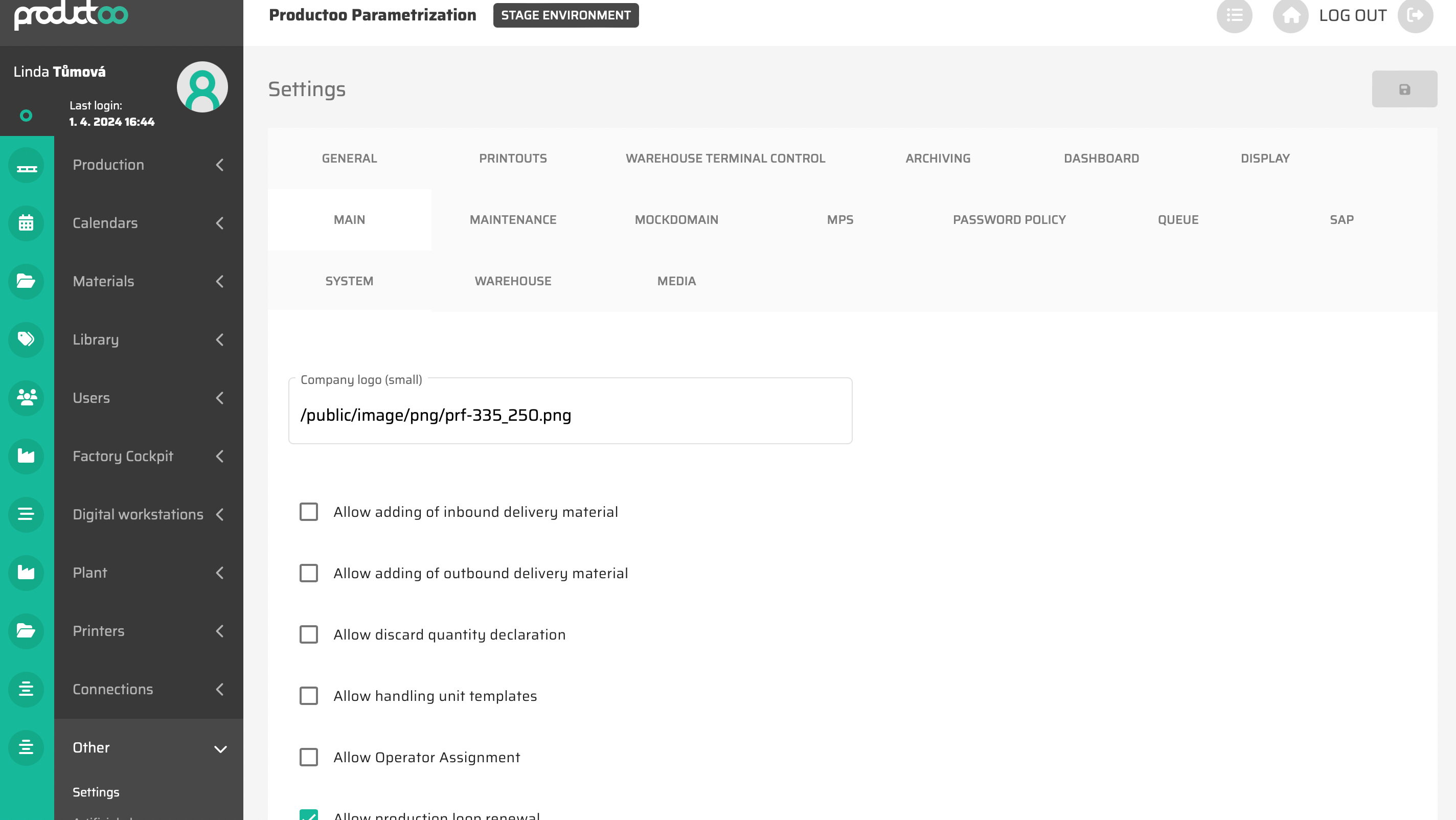
In the below table there are all parameters of the settings, tab Main with its description.
Parameter name | Limitations | Possible values | Description |
|---|---|---|---|
Allow adding of inbound delivery material | Checkbox | On/Off | It will allow additional items to be added to an already created Inbound Delivery. |
Allow adding of outbound delivery material | Checkbox | On/Off | It will allow additional items to be added to an already created Outbound Delivery. |
Allow discard quantity declaration | Checkbox | On/Off | Enables declaration of discard quantity in production. Discard/Bad quantity is still calculated as a finished quantity in terms of how much quantity is totally produced for Production Item, but is not included in the good quantity declared. |
Allow handling unit templates | Checkbox | On/Off | Enables the Handling Unit Templates functionality. |
Allow material coverage | Checkbox | On/Off | Enables Material Coverage calculation. Calculates future stock levels at any moment of materials based on current stock and planned production/consumption of individual materials. This calculation is represented in production queue with color marker with tooltip which provides detailed calculation information. |
Allow Operator Assignment | Checkbox | On/Off | During the process of assigning items to production, it will also make it possible to select a specific operator who should be present for this item. |
Allow parallel planning interactive mode | Checkbox | On/Off | When disabled, the production Parallel Planning is set to “read only” mode therefore no drag & drop functions are possible. |
Allow production loop renewal | Checkbox | On/Off | Enables kanban production loop automatic renewal. |
Allow Production Tools | Checkbox | On/Off | Enables the Production Tools functionality - production item can be created only with specific tools, based on Material Parametrization. |
Allow Production Versions | Checkbox | On/Off | Enables the Production Version functionality. |
Allow shift creation | Checkbox | On/Off | Enables manual shift creation in production line planning in adition to automatic shift creation based on line parametrization. |
Allow calculating production times by operator skill | Checkbox | On/Off | When activated, the expúected production time of production item is calculated based on skill level of operators assigned to this production item. |
Allows to exceed maximum production item quantity at shopfloor declaration | Checkbox | On/Off | It will make it possible to declare a larger quantity in production than was planned. |
Auto queue creation when Production line is created | Checkbox | On/Off | When new production line is created, also its production queue is automatically created. If not activated, the user have to manually create production queue for newly created line. Without queue no production can be done on the line. |
Auto-tag new media files | Checkbox | On/Off | When active, media files uploaded to Maintenance Notification and Maintenance Order automatically gets labels like “Equipment number”, “MO number” etc. |
Automatic preparation of reserved Outbound delivery materials | Checkbox | On/Off | Enables the function of automatic preparation of reserved items for dispatch. |
Automatically change Master item status based on its childs | Checkbox | On/Off | When active, Master orders changes their status based on the statuses of their direct children items. |
Calendar planning | Checkbox | On/Off | Enables usage of calendar templates for production and operator planning instead of simple Shit-Template. |
Deliveries - Allow confirmation alert for material handling unit change | Checkbox | On/Off | If activated, a notification is displayed every time the user changes the Handling Unit Template within an outbound order. |
Display invalid user authorization message | Checkbox | On/Off | If enabled, a warning is displayed when an unauthorized operation is attempted. |
Enable maintenance order assignment to myself on maintenance shopfloor view | Checkbox | On/Off | Allows user to assign a maintenance order to himself on the Maintenance Shopfloor View. |
Inbound Delivery autoclose when quantity is fully received | Checkbox | On/Off | Automatically close Inbound Delivery if all items are received. |
Is material group for Material required | Checkbox | On/Off | Defines whether it is mandatory to define a Material Group for a material. |
Is warehouse for Material required | Checkbox | On/Off | Defines whether it is mandatory to define a Warehouse for a material. |
Linear production | Checkbox | On/Off | Activates production times calculation based on linear extrapolation based on number of operators on shift. When in Material Master is defined production time only for 1 and 10 operators, than when for example 3 operators are assigned to shift, the system than can use production time for 1 operator as a closest known value, or calculate the estimated value with linear extrapolation from known values for 1 and 10 operators. |
More items to one place | Checkbox | On/Off | Allows more than one warehouse item to be placed per warehouse location. |
Multiple adding of Inbound Delivery material | Checkbox | On/Off | Enables the option to add more than 1 item to Inbound Delivery. |
New Material BOM is published by default | Checkbox | On/Off | Enables new BOM validation process. When disabled, the newly created BOMs are not available for usage in production un til their status is changed by responsible user to “Published”. With this parameter active, new BOMs are instantly published for production without any previous validation. |
Only team leader can approve vacation | Checkbox | On/Off | When active the operator leave request can be approved/rejected only by his Team Leader. When disabled everyone with access to the Attendance module can approve/reject leave requests. |
Outbound delivery - allow printing of singular items | Checkbox | On/Off | Enables printing of a form for individual Outbound Delivery items. |
Outbound Delivery - Material Note | Checkbox | On/Off | Displays the option to add a note to specific Outbound Delivery items. |
Outbound delivery mass preparation button | Checkbox | On/Off | Enables bulk processing of Outbound Deliveries. |
Pin is required when operator login into Digital Workstation | Checkbox | On/Off | A PIN is required when logging in to Shopfloor View. |
Process multiple items in background queue | Checkbox | On/Off | Enables the bacground creation of Production Items instead of instant creation. This enables for complex BOM structures to let the system create Production ITems in the background so the user can continue to work in the app instead of waiting for the process to finish. |
Prod. Item Inherits Material Characteristics Data | Checkbox | On/Off | When active, the newly created Production Items inherits the Characteristics values from the Material Master. |
Production item backflush | Checkbox | On/Off | Declaration of Production Item consumate the warehouse materials based on BOM. |
Production Item Multi Level Creation | Checkbox | On/Off | Activate the function of multi-level links between Production Items. It is necessary to use the Gantt chart of the production order plan. |
Production Items assignable only to following slot | Checkbox | On/Off | When using production slots in queue, the ability to assign Production Item to the slot is restricted only for the following slots and not those before the scheduled production time. Usable for example when running the Multilevel Queue Scheduler Artificial Planner which calculates the optimal plan for individual items based on multiple restrictions and it is needed to assign items to production slots (freezers or furnaces for example) and it is mandatory to select slots later than the algorithm has scheduled the items to protect any restriction collisions. |
Production Line Shift Scheme Mandatory | Checkbox | On/Off | Defines whether it is mandatory to define a Shift template or Shift module for a Production Line. |
Reserve entire materials for production item recipe after production item creation | Checkbox | On/Off | If activated, the entire amount of Warehouse Material is always reserved for production within the definition of consumption. |
Shopfloor View Automatic Creation | Checkbox | On/Off | If activated, the shopfloor view is automatically pre-created when a new production line is created. |
Show only relevant Production Items | Checkbox | On/Off | When active, in the Distribution table or Parallel planning will be visible only those Production Items that are assignable to any of the production lines displayed on the screen. In combination with User-Production Line visibility definition it creates powerfull tool to streamline system usage and hide all non-relevant items for logged user. |
Show production line background assign button | Checkbox | On/Off | When active, when assigning Production Items to Production Lines the option for background assignment will be visible which enables user to run the assignment process in the background instead of waiting for its completion. |
Simple Assign Process | Checkbox | On/Off | A simplified process of assigning a production item to a line is used - dragging an item to a line automatically starts the assignment process without a verification dialog. |
Transformation of logistic list pick item after logistic recalculation | Checkbox | On/Off | |
Use exact quantity when receiving / shipping deliveries | Checkbox | On/Off | If “On”, Inbound Delivery Materials and Outbound Delivery Materials are switched to status Received/Shipped only when exact and full quantity is received/shipped. If “Off”, Inbound Delivery Materials and Outbound Delivery Materials are marked as Received/Shipped when first reception/shipping was done (no matter which quantity was received/shipped). |
Use new handling unit | Checkbox | On/Off | |
Visibility of Handling Unit in Inbound Delivery | Checkbox | On/Off | The Handling Unit Template is displayed in the Inbound Delivery detail. |
Delivery satisfaction score | Chars | Free text | Marker value for dashboard widget - Delivery Satisfaction Score. |
Maintenance Order On Time Score Goal | Chars | Free text | Marker value for dashboard widget - Maintenance Order On Time Score. |
Orders on time score goal | Chars | Free text | Marker value for dashboard widget - Orders on time score. |
Number of days of pick item reservation prioritization | Chars | Free text | |
Count of email for summary sending | Chars | Free text | The maximum number of emails in summary email notifications. |
Default changeover time | Chars | Free text | Definition of the default changeover time, which is taken into account if it is not defined for material pairs, material groups or production lines. |
Number of weeks of generating logistic list runs | Chars | Free text | Definition of the number of weeks how far in advance logistic runs are generated. |
Reason code of incomplete palette | Chars | Free text | Database ID for reason code Incomplete Pallet. |
Recache time interval | Chars | Free text | |
Recache time interval in hours | Chars | Free text | |
Safety time for outbound delivery - seconds | Chars | Free text | |
scheduled_days | Chars | Free text | The number of days how far in advance shifts are generated. |
Time period for summary sending | Chars | Free text | |
Default Handling Unit color visualization | Defined values |
| Defines on which screens the color highlighting of the Handling Unit Template information should be applied. |
Default Production Item Creation Strategy | Defined values |
| Default strategy settings for creating Production Items. It can be manually changed during the creation process.
|
Defines target of data archivation | Defined values |
| Choosing the destination location of the archive files. |
Estimated Time Calculation | Defined values |
| |
Material primary indicator | Defined values |
| Defines what data is used as material primary information in the whole application, if not differently specified for speci user. |
Material secondary indicator | Defined values |
| Defines what data is used as material secondary information in the whole application, if not differently specified for speci user. |
Material terciary indicator | Defined values |
| Defines what data is used as material tertiary information in the whole application, if not differently specified for speci user. |
Redbox Sorting | Defined values |
| Defines the default Redbox sorting. |
Backup email | Chars | Free text | Definition of the email address to which the backup data should be sent. |
Backup queue path | Chars | Free text | Definition of the folder path to which the backup data should be saved. |
Quality Test Code | Chars | Free text | |
Show Reservations in OD Dialog for | Chars | Free text | |
Test email | Chars | Free text | |
Test email name | Chars | Free text |