
Launcher Logic (Checking and Releasing a Batch)
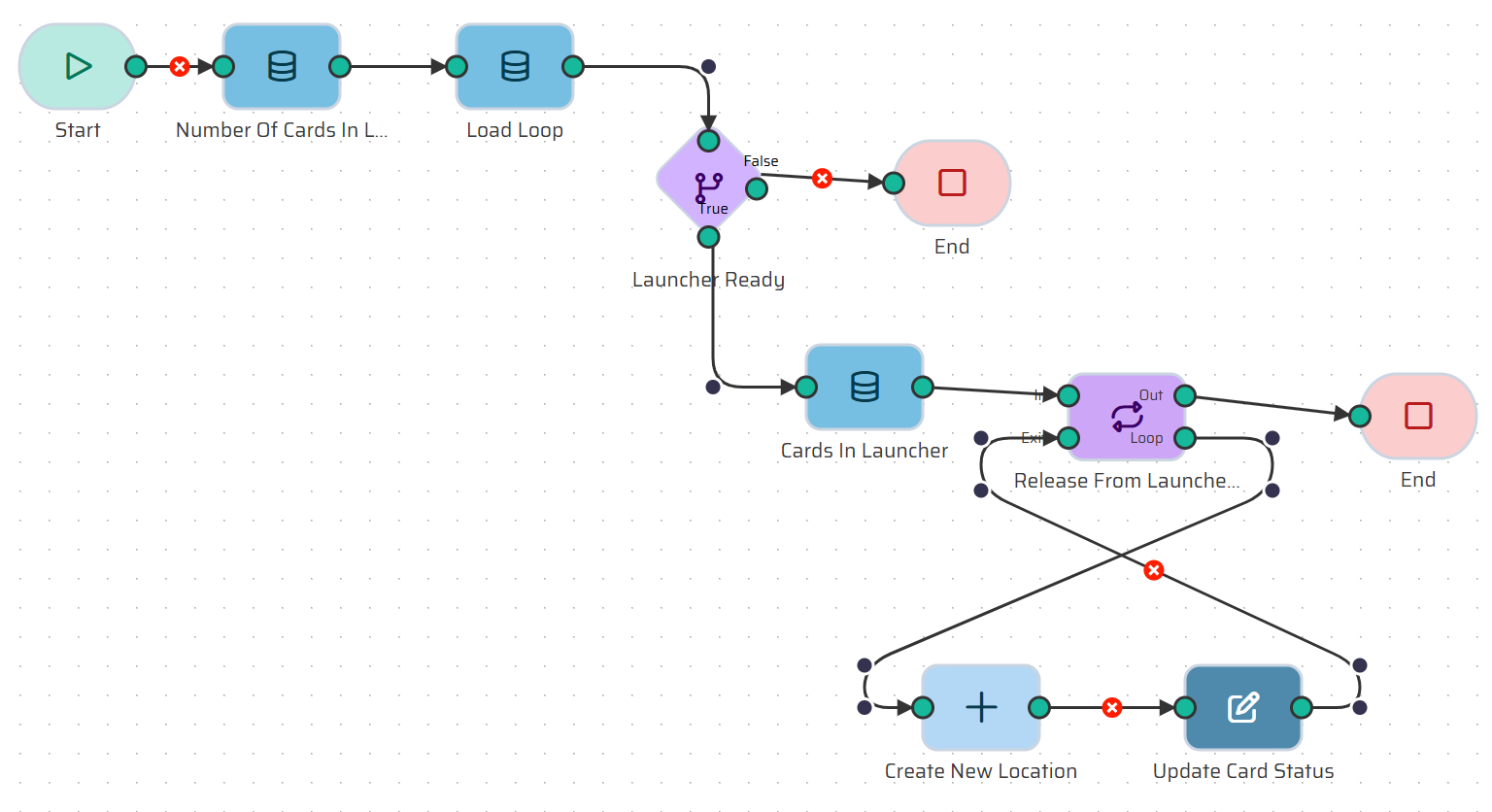
The Launcher is the starting point of our process. Cards wait here until a sufficient batch size is reached. If the Launcher contains a number of cards equal to or greater than the defined loop batch size, they are released to the first production line's queue. Let's build this logic.
Create a new flow named Launcher Logic.
Step 1: The Start Node We need to tell the process which loop to check.
Add an Input Variable:
KANBAN_LOOP_ID(Type: Number).
Step 2: Count Cards and Load Loop Details We need two pieces of data: the current card count and the target batch size.
Add a Load Object node named Number Of Cards In Launcher. Select the
KANBAN_CARDS_VIEW, check Count records, and filter whereKANBAN_LOOP_IDEquals your Start variable andLAST_LOCATIONEqualsLauncher.Add another Load Object node named Load Loop. Select the
KANBAN_LOOPentity to get theBatch_Sizeproperty. Filter by ID and set the Limit toSingle record.
Step 3: Evaluate Batch Size (If Node)
Add an If node named Launcher Ready.
Condition: We want to check if the batch requirement is met. Use the expression:
{{datastore.process.LoadLoop.Batch_Size}} <= {{datastore.process.NumberOfCardsInLauncher}}.False Branch: If the condition is false, connect this to an End node. The batch is not ready, so the process stops here.
Step 4: The True Branch (Release Cards) If the batch is ready, we assign the cards to the first line.
Connect the True branch to a new Load Object node named Cards In Launcher. Load from
KANBAN_CARDS_VIEWusing the exact same filters as Step 2, but set the Limit to match the batch size:{{datastore.process.LoadLoop.Batch_Size}}. This ensures we only release the correct number of cards.Add a Loop node named Release From Launcher (Type: Foreach) and iterate over the data from the Cards In Launcher node.
Step 5: Move to First Line (Inside the Loop) For every card in the loop, we create a new location and update its status.
Add a Create Object node named Create New Location. Entity:
KANBAN_CARD_LOCATION. SetId_kanban_cardtoitem.card_idandId_production_linetoitem.loop_min_position_line_id(our custom view already calculated the first line for us!).Add an Update Object node named Update Card Status. Entity:
KANBAN_CARD. Filter byidEqualsitem.card_idand update theid_statusfield to represent your active production status.Close the loop and connect it to an End node.
Next up: ➔ Release to Launcher (Recycling Finished Cards)