
Relationship between Flow, Widget, Layout and Application Structure
While each layer of the Process Builder serves a distinct purpose, they are designed to operate as a single composable system.
An application in P4 is not written as a linear script - it is assembled from these four dimensions of definition: Flow (logic), Widget (interaction), Layout (composition), and Application Structure (navigation).
Understanding their relationship is essential for designing scalable and maintainable configurations.
Flow – the Logic Engine
A Flow represents the invisible logic of the system - the set of actions, conditions, and transformations that occur behind every user interaction.
Flows manipulate data, perform calculations, trigger automation, and communicate with external systems. They are the functional core of any process definition.
Flows are invoked from:
Widgets (for example, a button executing a flow when clicked).
Artoo AI (executing a process in response to a natural language command).
They do not handle presentation directly - only what happens in the background.
Widget – the Behavioral Layer
A Widget represents user intent and interaction logic.
It connects visual events (clicks, inputs, selections) to system actions (flows, updates, UI refreshes).
Each widget defines:
Which Flow it should trigger.
Which variables it should send or receive.
How the UI should react to outcomes (e.g., showing a message, refreshing a table, opening a dialog).
Widgets therefore act as the bridge between the human and the system - translating action into logic and logic back into visual feedback.
Layout – the Structural Context
A Layout defines the spatial and logical composition of a page.
It organizes widgets, components, and processes into a coherent visual unit - such as a dashboard, a detail form, or a list view.
When the user navigates to a layout, it loads its initial data flows and binds them to the widgets on the page.
Layouts establish context for widgets and flows:
They determine which data are available.
They specify how results are displayed.
They link to flows that define the page’s lifecycle (onLoad, onSave, etc.).
A well-designed layout encapsulates both structure and behavior, allowing pages to be reused across modules with minimal adjustments.
Application Structure – the Navigational Frame
The Application Structure defines how layouts are assembled into modules and pages, creating the navigation hierarchy of the application.
It specifies:
Which pages belong to each module (e.g., Maintenance, Production).
The order and visibility of pages.
The relationships between parent and child modules.
From the user’s perspective, Application Structure is what gives coherence to the whole experience - transforming isolated layouts into a navigable product.
How They Work Together
A user navigates through the Application Structure → this loads a Layout.
The Layout defines which Widgets are displayed and how they interact.
A Widget triggers a Flow when an action occurs.
The Flow performs logic, updates data, and returns results to the Widget.
The Widget updates the Layout dynamically based on Flow output.
This cyclical interaction — Structure → Layout → Widget → Flow → Layout — is what gives P4 applications their responsiveness and configurability.
Practical Example
Consider a page in the Maintenance Module that lists open work orders:
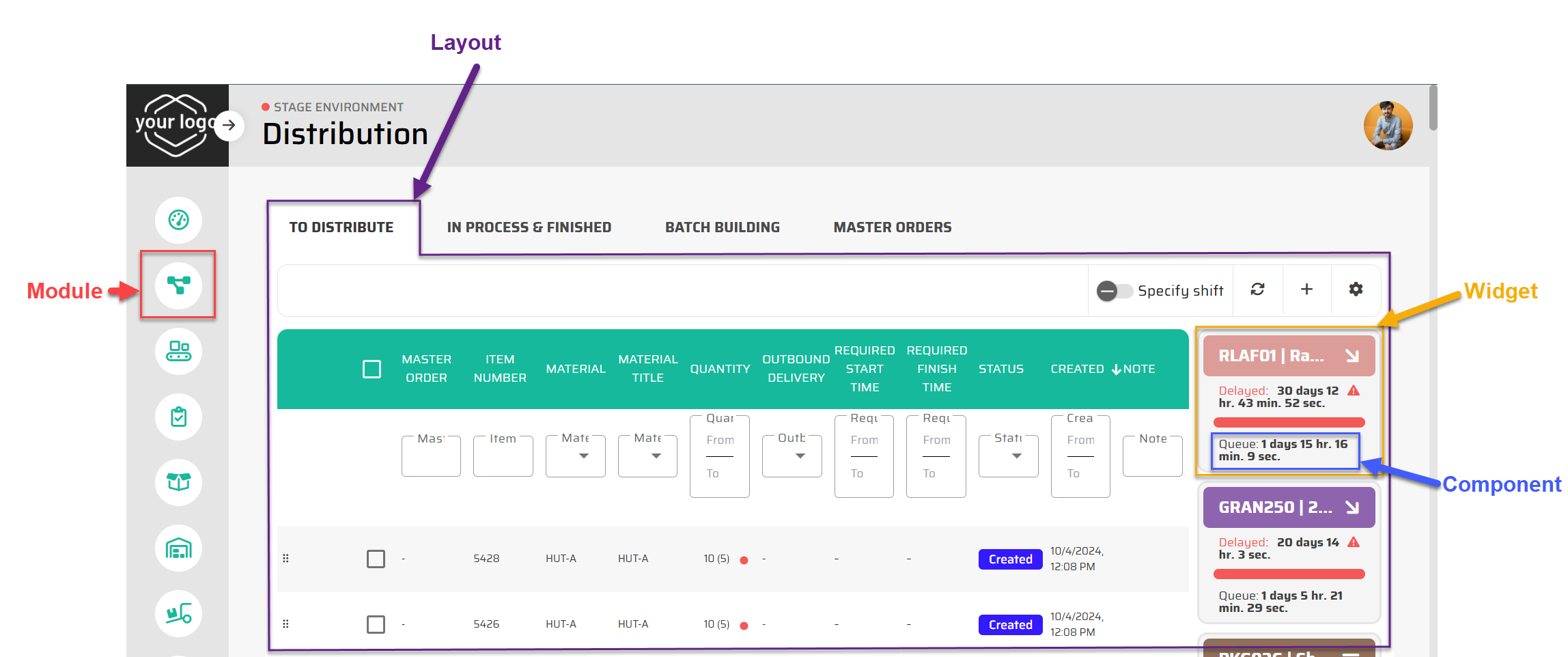
The Application Structure defines a “Distribution” module under the Production Control Application.
The Layout arranges a widgets like table and KPI boxes.
Each Widget (for example, a “Production Line” box) is composed of Components (text, button, progress bar, …) and calls a Flow that updates order status in the database.
After completion, the widget triggers a refresh in the layout, showing the updated data instantly.
In this way, a complex interactive system emerges entirely from metadata — not from hard-coded logic.
Summary
Flows handle what happens, Widgets handle how it happens, Layouts define where it happens, and Application Structure defines where it belongs.
Together, they form the four dimensions of P4’s Process Builder — an ecosystem where applications are not programmed but composed, allowing total flexibility, modularity, and real-time adaptation.