
Barcodes
Barcodes are a widely used technology in manufacturing to improve the accuracy and efficiency of tracking products, inventory management, and supply chain operations. Barcodes consist of a series of vertical bars and spaces that represent encoded information about a product, such as its serial number, batch number, or other identification details.
In manufacturing, barcodes are typically used to track products at various stages of the production process, from raw materials to finished goods
This tab shows all the Barcodes created within the P4 application and allows us to create, edit, or delete the Barcodes. The list of Barcodes can be filtered by all shown columns, which means by:
ID
Title
Code
Entity
Status
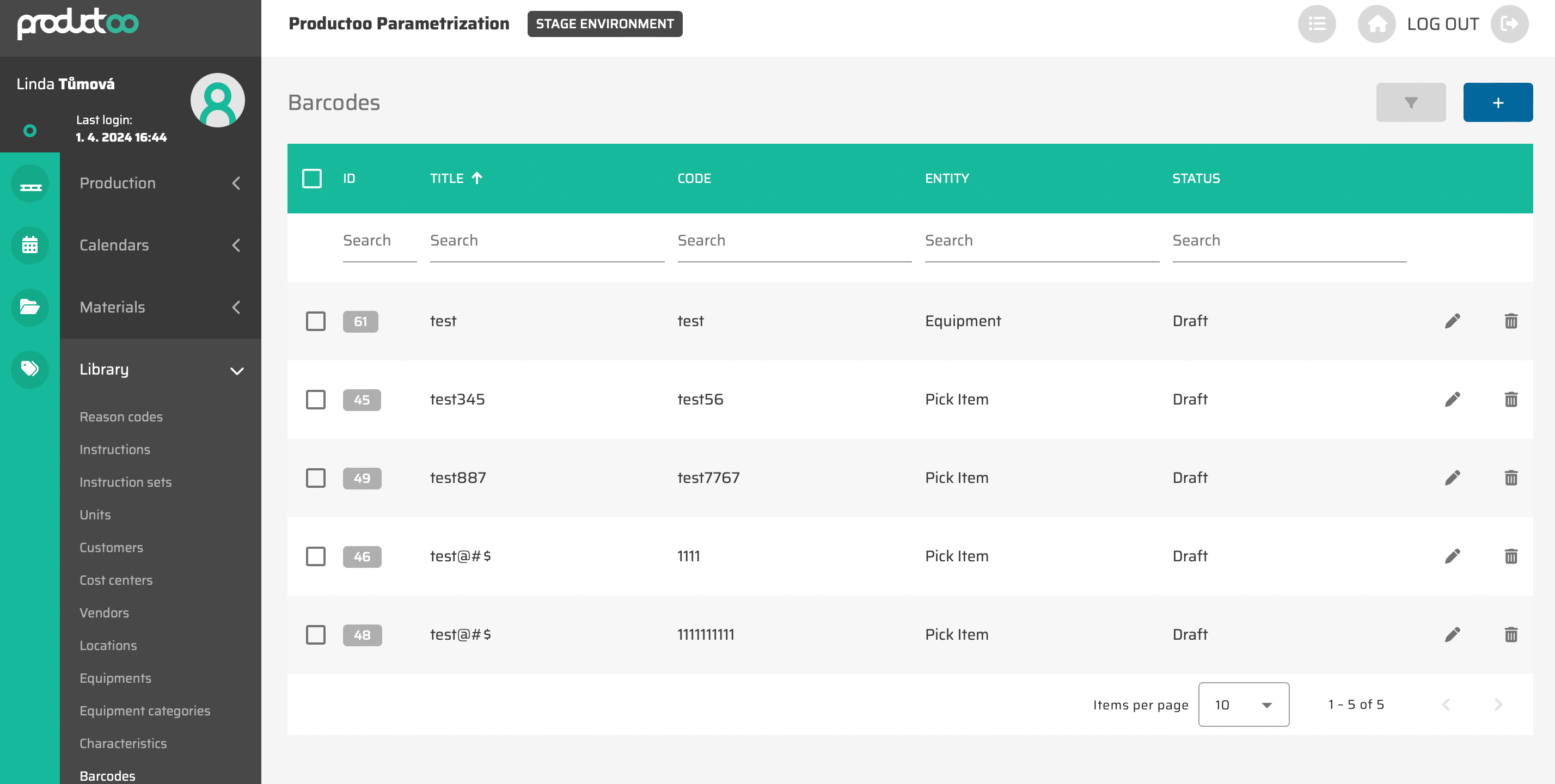
From the operational point of view, it is possible to
create new Barcodes via :create: button in the top right corner of the page (this possibility will show empty Barcodes detailed settings page).
edit existing Barcodes via
 button which will appear after moving cursor to the Barcodes you want to edit (this possibility will show Barcodes detailed settings page with saved data).
delete single existing Barcode via
 button which will appear after moving cursor to the Barcode you want to edit
delete multipleBarcodes via choosing these (via clicking on the checkbox in the beginning of each Barcode) and then clicking on the
 button which will appear in the top right corner